For Australian households

How many subscriptions are you paying for? And how many do you actually know about?

Budgits finds every one, adds them up and shows you what is safe to spend before payday.

Opens in December · Founding members go first
Read-only, always
No ads, ever
Made in Australia
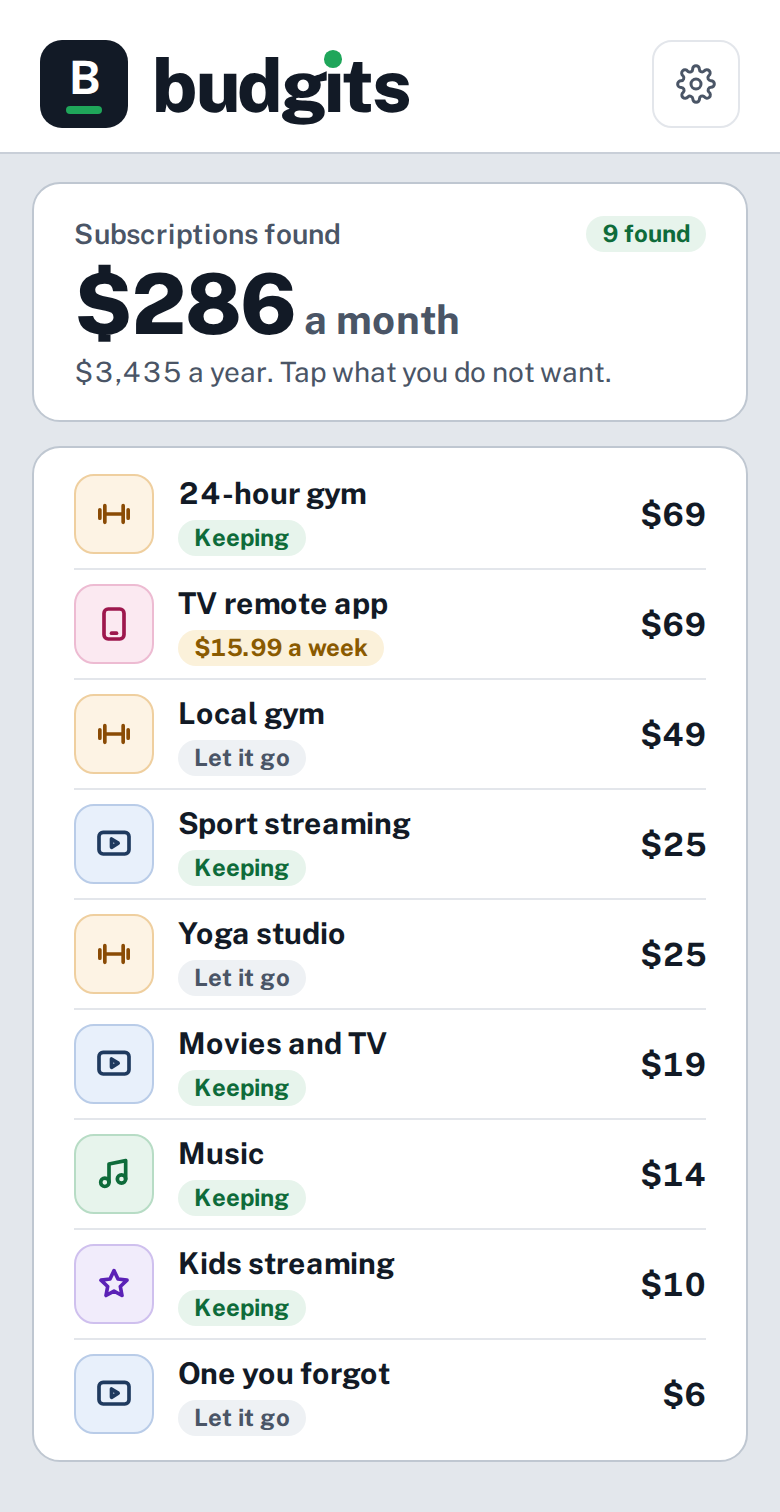
The Budgits subscriptions screen: 9 subscriptions found, $286 a month, $3,435 a year. A list of gyms, streaming services, music and an app billed weekly, each marked Keeping or Let it go. Sample numbers.

What the scan finds. Sample numbers.

Count along at home

Three questions. Most people guess low on all three.

How many accounts have you got?

Banks. Loans. Cards. Buy now, pay later. Count the lot.

How many subscriptions are you paying for?

Streaming. Apps. Gyms. The free trial that never ended.

How many devices are in your house?

Phones. Watches. Laptops. TVs. Earbuds. Nearly every one has a plan or a subscription behind it.

Budgits reads every transaction across all of your accounts. Then it shows you every account, every subscription and every phone, internet and cloud bill. You decide what stays.

What the scan finds

It finds them all. You decide what stays.

You have 3 gym memberships.

24-hour gymLocal gymYoga studio
$1,716 a year

$143 a month.

You have 5 streaming services.

MoviesSportKidsMusicOne you forgot
$888 a year

$74 a month.

A free trial became $15.99 a week.

App store trial
$831 a year

The small ones hide the longest.

Sample numbers. Yours come from your own accounts.

Budgits Planner Pty Ltd uses your email address to send you news about the Budgits launch. Netlify processes this form and may handle your details in the United States. Unsubscribe any time. See our Privacy Policy or email privacy@budgits.com.

Real numbers, not sample ones

$6,800 a year. Found in the founder's own accounts.

Before Budgits had a single customer, its founder ran it on his own accounts. This is what it found: money going out on things he had forgotten, or no longer wanted.

$2,700Ten forgotten subscriptions. Already cancelled.
$2,282Two gym memberships. Being cancelled.
$1,831Streaming and others. Next to go.

One household's result. Yours will be different.
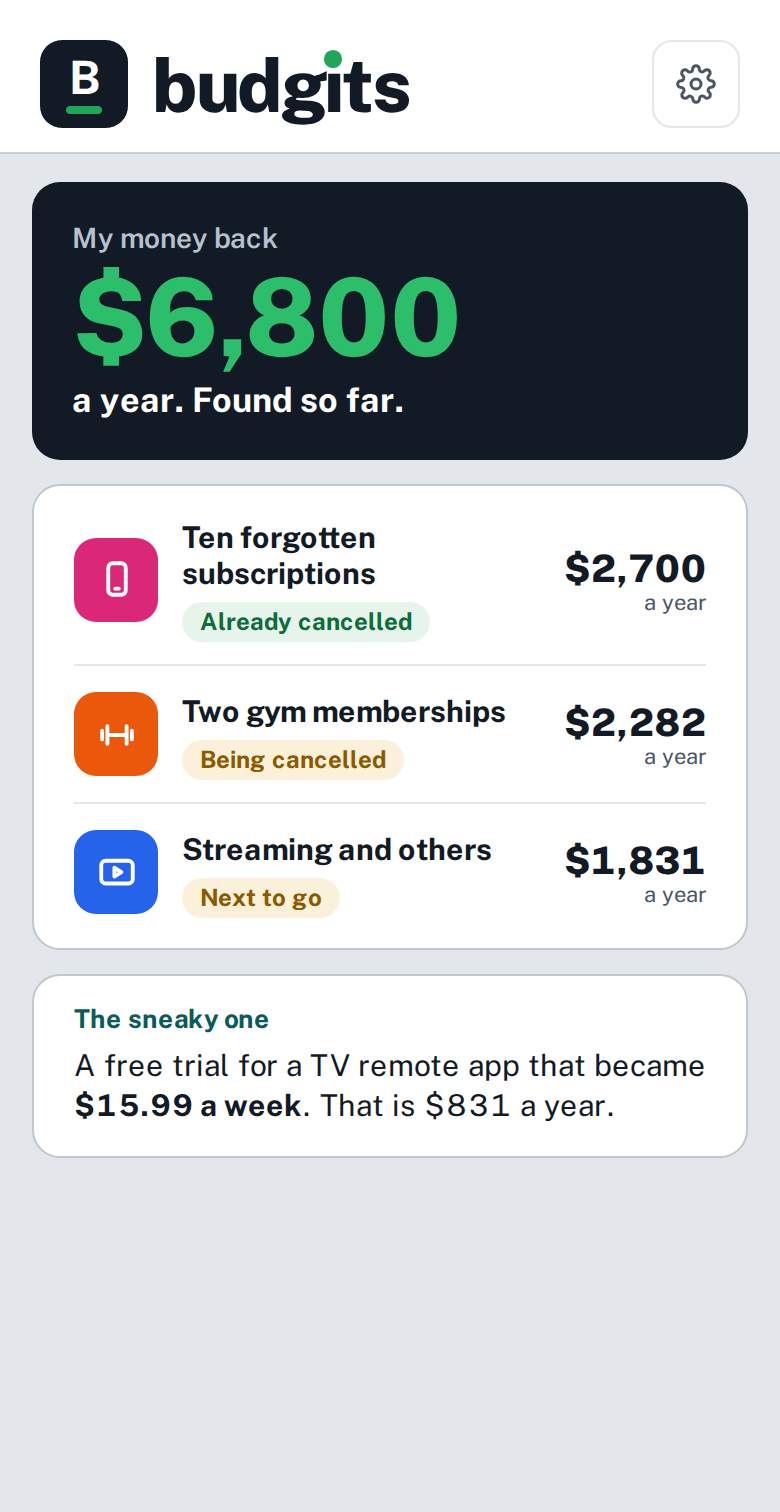
The Budgits My money back screen: $6,800 a year found so far in the founder's own accounts. Ten forgotten subscriptions $2,700 already cancelled, two gym memberships $2,282 being cancelled, streaming and others $1,831 next to go.

The founder's own accounts. Real numbers.
A look inside
Swipe →

Five screens. Have a flick.

What it found.

The My money back screen: $6,800 a year found so far in the founder's own accounts.

The founder's own accounts. Real numbers.

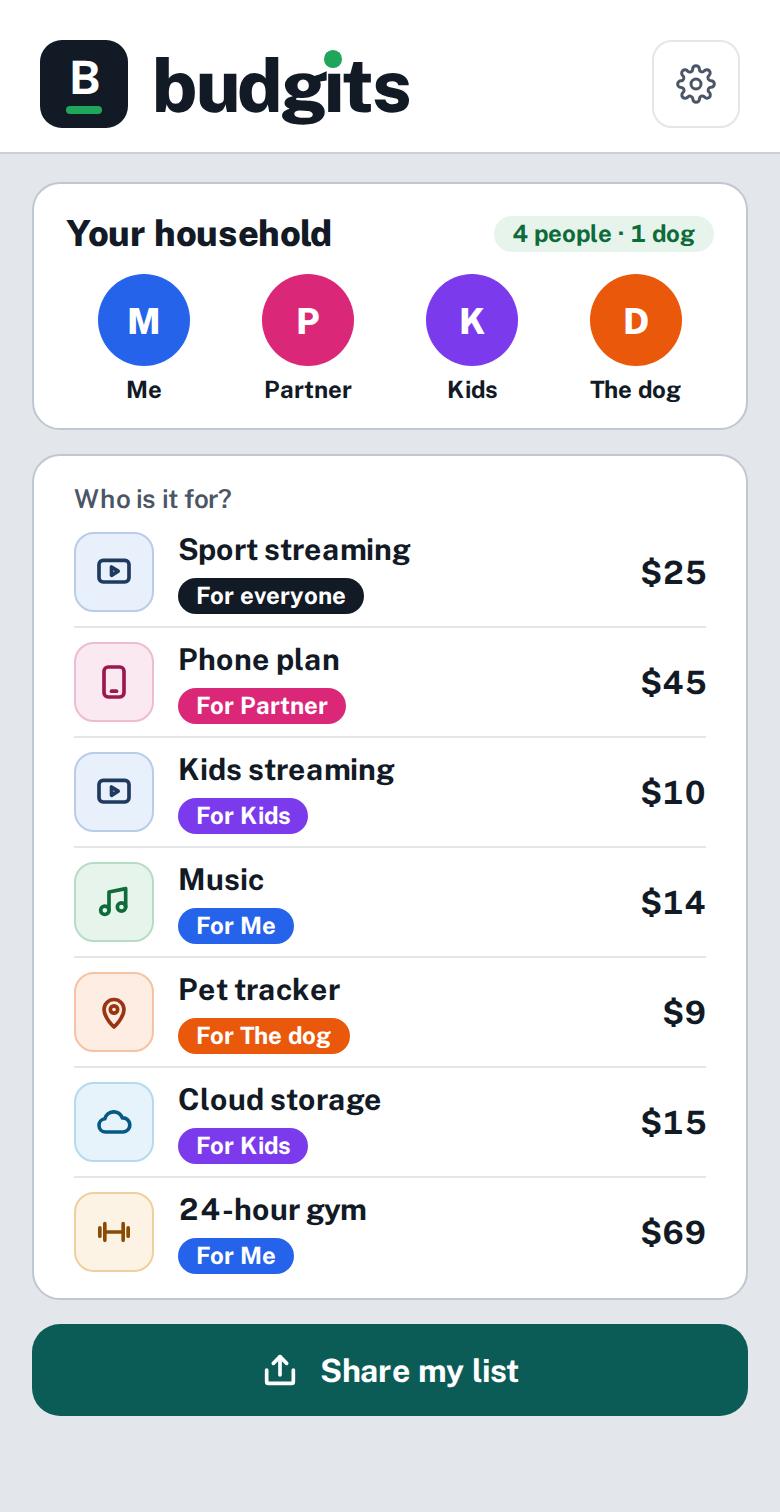
Who pays for what in your house?

The household screen: four people and a dog, each subscription tagged to who it is for, and a Share my list button. Sample numbers.

Tag each one to who it is for. Share your list. Find the double-ups.
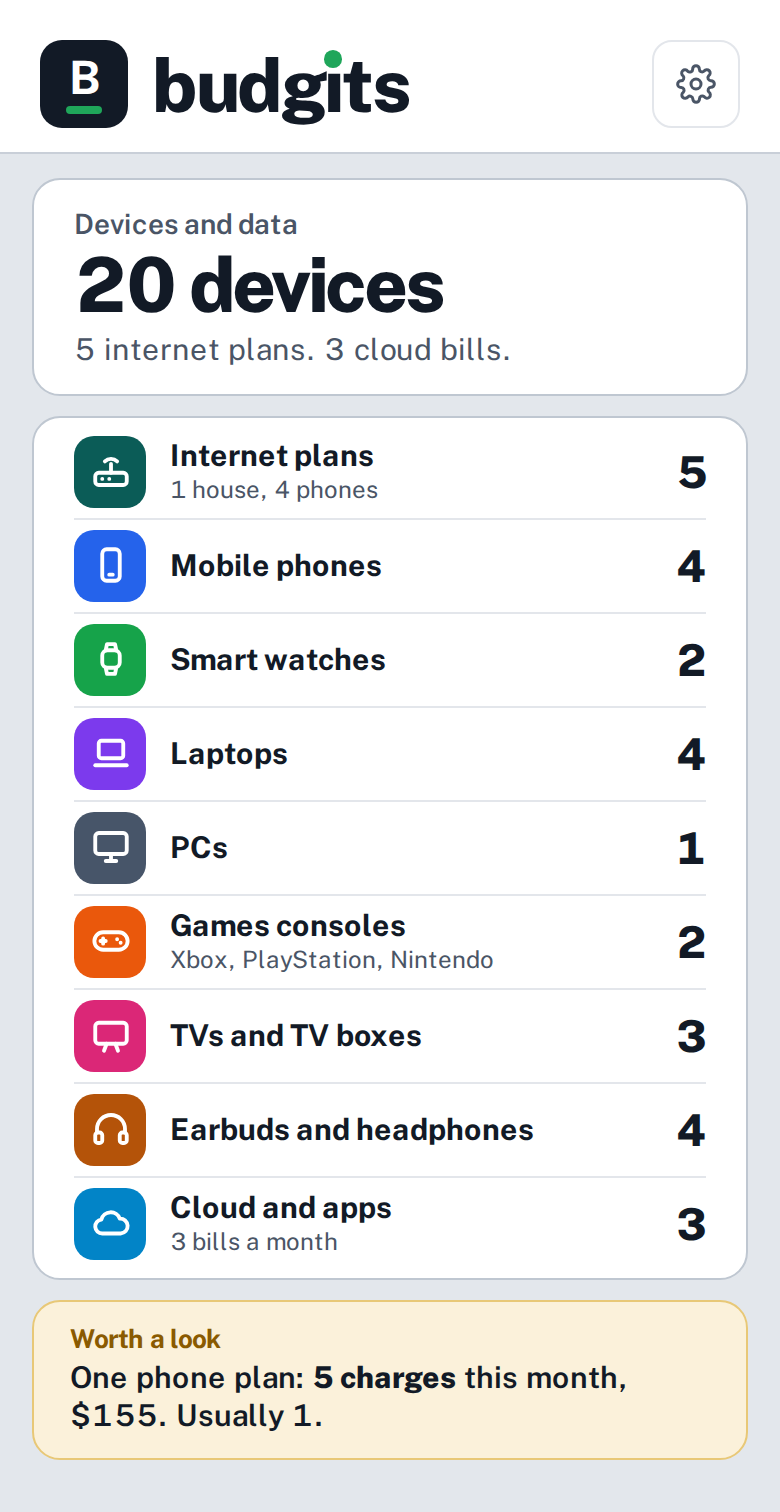
How many devices does your household have?

The devices and data screen: 20 devices, 5 internet plans and 3 cloud bills. Sample numbers. Coming after launch.

Coming after launch

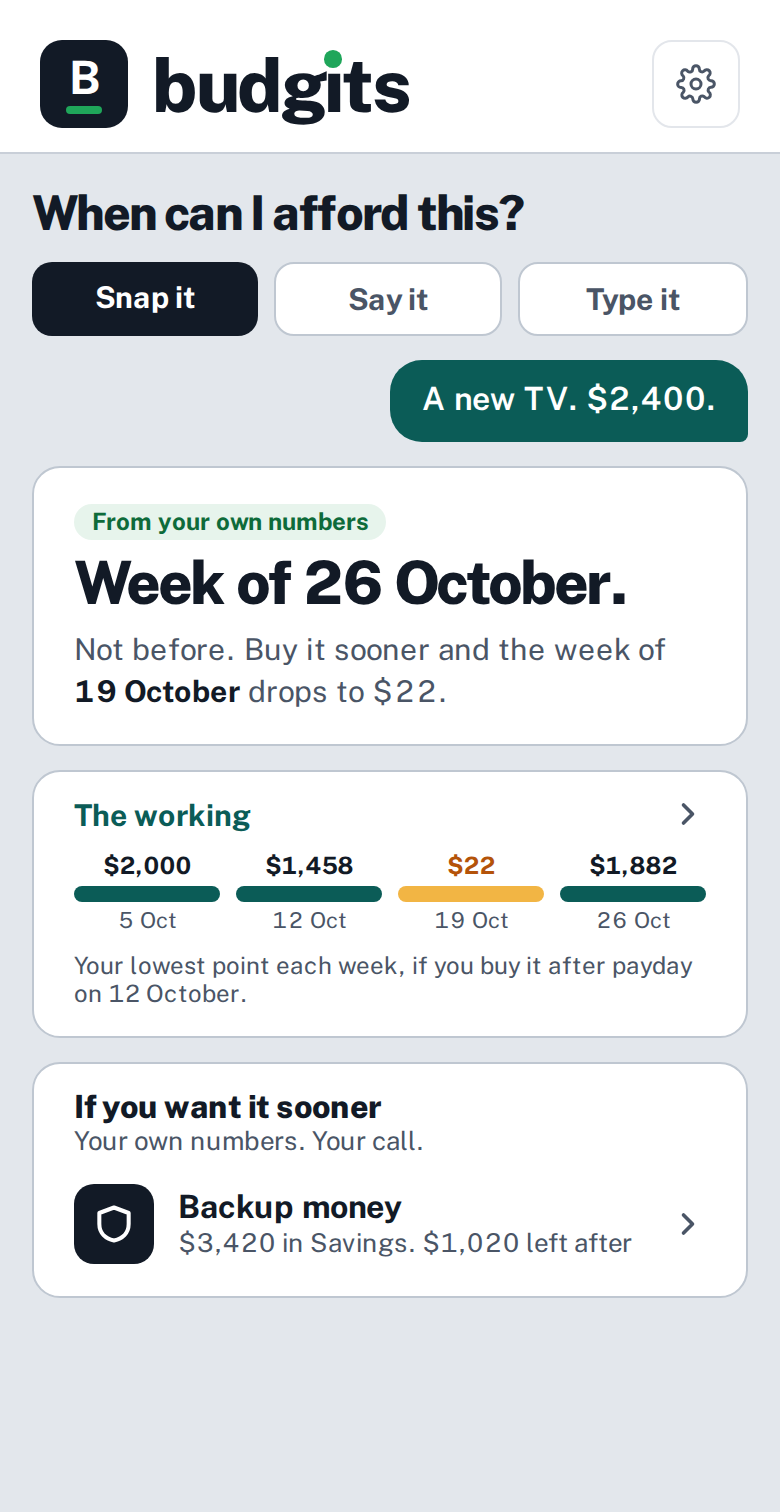
When can I afford this?

The When can I afford this screen: a $2,400 TV and the answer Week of 26 October. Sample numbers.

The answer is a date, not a no.

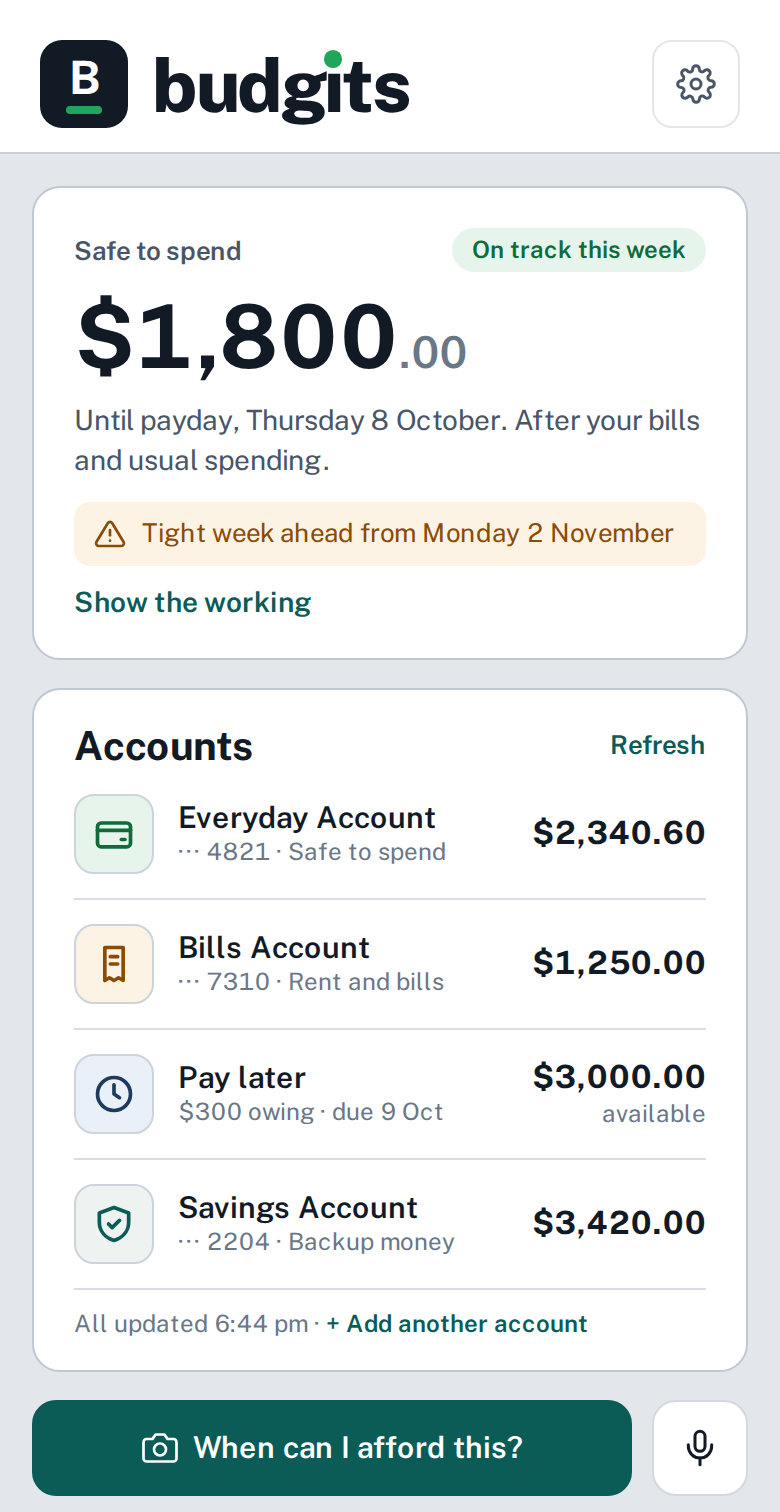
One place for all your accounts.

The home screen: safe to spend $1,800 until payday and four accounts with their balances. Sample numbers.

What you have and what is safe to spend.

Sample numbers, except where it says real.

Built around your household

Who pays for what in your house?

Two people. One streaming service. Two bills. Sound familiar?

Say who is in your household. People and pets.
Tag every subscription to who it is for.
Send your list to the people you live with and find the double-ups.
MePartnerKidsThe dog
The Budgits household screen: four people and a dog, with each subscription tagged to who it is for, and a Share my list button. Sample numbers.

Your household. Sample numbers.

Devices and data
Coming after launch

How many devices does your household have?

Phones. Watches. Laptops. TVs. Consoles. Earbuds. Nearly every one has a plan or a subscription behind it.

You count the devices. Budgits counts what they cost.
Every phone, internet and cloud bill in one place.
A heads-up when one plan is topped up again and again.
The Budgits devices and data screen: 20 devices, 5 internet plans and 3 cloud bills, listed by type including games consoles, with a note that one phone plan was charged five times this month. Sample numbers. Coming after launch.

Devices and data. Sample numbers. Coming after launch.

Your banking app is a rear-view mirror.

Budgits shows the road ahead.

The look ahead

See the tight week before it happens.

Budgits shows the lowest your money gets each week, for the weeks and months ahead. You hear about a tight week early, while there is still time to do something about it.
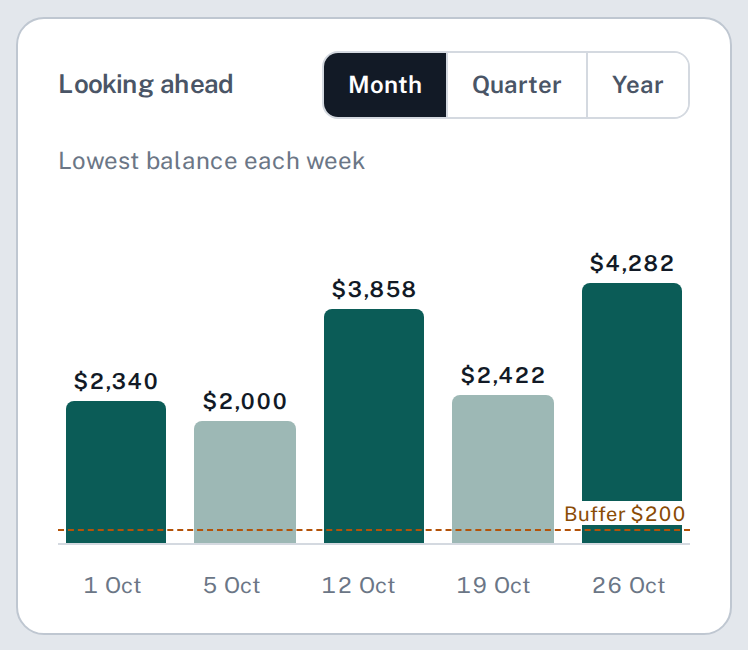
The Looking ahead chart: the lowest balance in each of the next five weeks, with the two lowest weeks shown in a lighter colour and a $200 buffer line. Sample numbers.

Sample numbers.

Before you buy

When can I afford this?

Snap it, say it or type it. Budgits answers from your own numbers.

The answer is a date, not a no.

The When can I afford this screen: a $2,400 TV, the answer Week of 26 October, the working week by week, and the option to use backup money sooner. Sample numbers.

Sample numbers.

Every day, one quick look

One place for all your accounts.

What you have, what is safe to spend and what is coming. No more opening three bank apps in the queue at the checkout.

Every account on one screen
Savings are never counted as spending money
Pay later accounts shown as what you owe
The Budgits home screen: safe to spend $1,800 until payday, a warning about a tight week ahead, and four accounts with their balances. Sample numbers.

The home screen. Sample numbers.

Why Budgits is different

The step before budgeting.

Other apps start you at step two. You can not budget what you can not see.

Step one · Budgits

Know where it goes.

Every account. Every subscription. Every bill. The weeks ahead.

Step two · Later

Then budget.

Budgets and goals, once you know what you are working with.
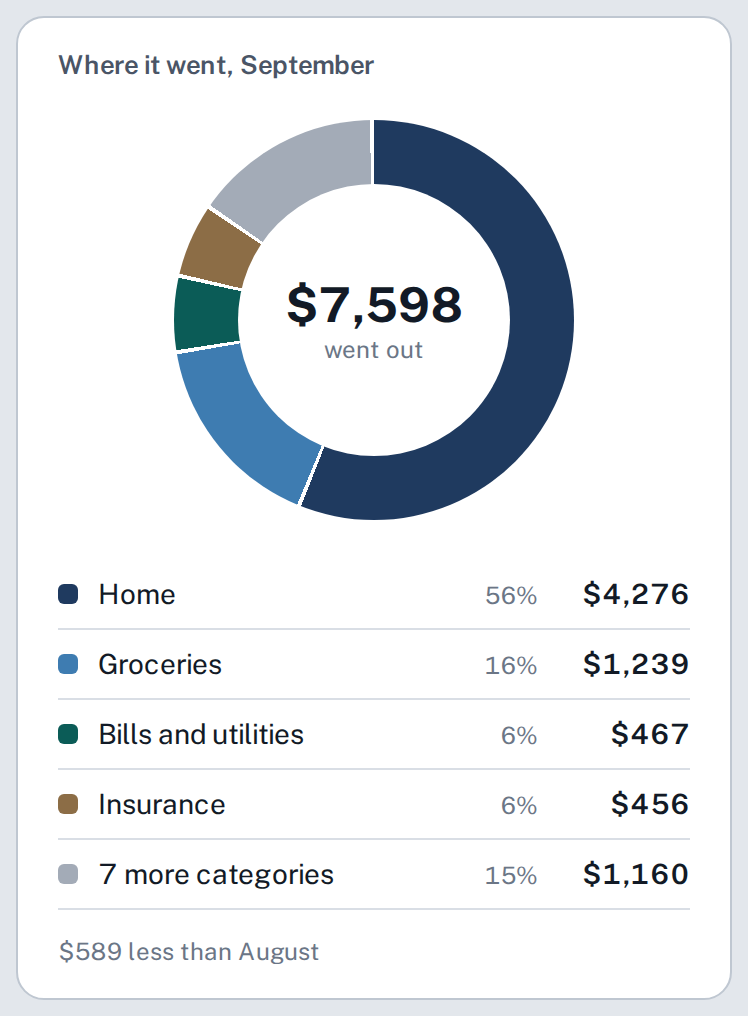
The Where it went card: a ring chart of one month of spending, $7,598 in total, split into home, groceries, bills and utilities, insurance and seven more categories. Sample numbers.

Where it went. Sample numbers.

Our promise

What Budgits will never do.

Budgits earns money one way: members paying for Budgits. That keeps us on your side.

No ads.

You are the customer, not the product.

No loans.

Budgits never sells or suggests credit.

No partner offers.

Nobody pays to be put in front of you.

How it works

Set up once. Then we show you the future.

1

Show Budgits your accounts

Link your bank, or upload your statements as CSV or PDF. Read-only either way.

2

We find the patterns

Your pay, every bill and every subscription, counted forward week by week for 12 months.

3

Know what is safe to spend

One number, with every bill already counted. A tight week coming? You hear about it early.

The fine print, up front

It reads. It never touches.Budgits can never move money or change anything at your bank.

You choose how to startLink your bank or upload statements. Budgits works from either.

Made in AustraliaBuilt for Australian bills and pay cycles. Your bank data stays in Australia.

The numbers, not adviceBudgits shows the gap. What you do about it stays your call.

Founding members

The first 100 keep their price for life.

The first look is free: Budgits tells you how many subscriptions it found and what they add up to. The full list is a small one-off cost. Budgits Live then keeps watching the year ahead for you. You see every price before you pay a cent.

OPENS IN DECEMBER
Founding 100

Join the list now and you are first in line for a founding place.

Safe to spend and the year ahead
When can I afford this?
My money back
Your household, on one screen
Join the founding list
Questions

The honest answers.

Do I need to connect my bank?

No. You can link your bank or upload the statements you download from your banking app. Both are read-only.

Which banks work?

Most Australian banks let you download statements as CSV or PDF. Budgits reads both.

Is this financial advice?

No. Budgits does the maths and shows you the numbers. The decisions stay yours.

What is free and what is paid?

The first look is free: how many subscriptions Budgits found and what they add up to. The full list is a small one-off cost. Budgits Live, the year ahead and Life, is a monthly subscription. Nothing is charged unless you choose it.

Does Budgits show ads or sell loans?

No. No ads, no loans and no partner offers. Budgits earns money one way: members paying for Budgits.

How does Budgits count my subscriptions?

You link your bank or upload your statements. Budgits reads every transaction across all of your accounts and lists everything that repeats, with what it costs a month and a year. You decide what stays.

What makes Budgits different from a budgeting app?

Budgits is the step before budgeting. It shows where your money goes and what is coming, so you know what you are working with. Budgeting tools come later.

Can I delete everything?

Yes. One tap in Setup, any time.

Know what is coming.

Opens in December. Join the founding list and be first in.

Budgits Planner Pty Ltd uses your email address to send you news about the Budgits launch. Netlify processes this form and may handle your details in the United States. Unsubscribe any time. See our Privacy Policy or email privacy@budgits.com.